将 Dashboard 变成 Copilot
将 Superset 仪表盘转换成两个 AI 子代理:一个用于自助取数和生成 SQL 的主子代理,以及一个用于指标对比和根因分析的归因子代理。
本教程使用 Superset plugin、通用 dashboard-bootstrap skill 和 Dosi semantic adapter 完成整个流程。Dashboard 发现和 SQL 导出由 plugin 负责;skill 负责用户选择和流程编排,并将导出的 SQL 路由给 Datus 的内置 context 构建 agent。
本教程从哪里开始
本教程从已有 Superset Dashboard 开始。如果你希望从源数据构建数据管道并创建新的 Dashboard,请阅读端到端数据工程。第一次使用 Datus 时,建议先完成安装并完成第一次提问。
为什么选择 Dashboard Copilot?
传统 BI 仪表盘是静态的:它们展示预定义的图表和指标,但用户无法提出后续问题,也不能探索预构建内容之外的数据。Dashboard Copilot 将仪表盘转换成分析 agent,使其能够:
- 使用与仪表盘相同的表和 SQL 证据回答临时问题;
- 在仪表盘 Knowledge Base 范围内生成 SQL;
- 跨时间和维度比较指标;
- 对指标变化进行归因和根因分析。
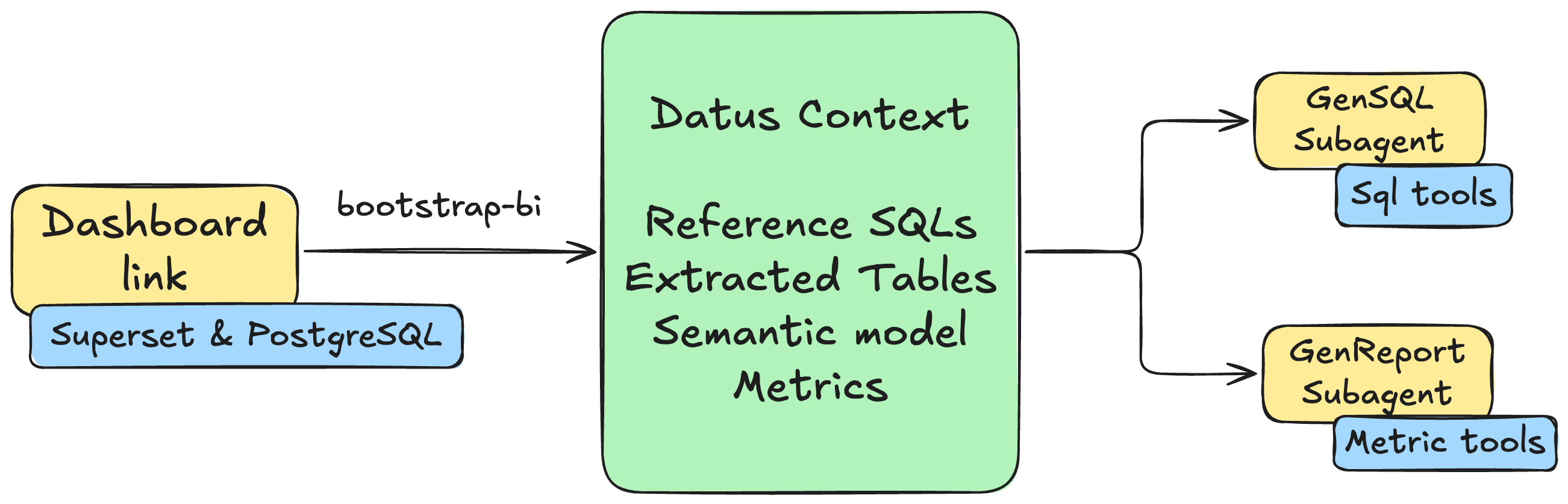
Bootstrap 首先构建 reference SQL 和 semantic metrics,然后创建两个带 scoped context 的子代理:
- 主子代理:基于仪表盘的 tables、metrics 和 reference SQL 提供自助取数。
- 归因子代理:提供指标对比、维度归因和根因分析。
前置条件
开始前需要安装:
- Docker Desktop,或支持 Docker Compose 的 Docker Engine;
- Python 3.12 和 Datus;
- Git、
curl和unzip。
以下命令使用 ~/datus-dashboard-copilot-demo 作为工作目录。它会部署本教程固定使用的 Superset 示例环境,并将生成的 SQL 和 semantic assets 保存在该目录下。
步骤 1:部署 Superset 和 PostgreSQL
下载本地 Superset 环境:
mkdir -p ~/datus-dashboard-copilot-demo
cd ~/datus-dashboard-copilot-demo

curl -L -o datus-dashboard-copilot-stack-v1.zip \
  https://github.com/Datus-ai/datus-quickstart-data/releases/download/data-engineering-v1/datus-dashboard-copilot-stack-v1.zip

unzip -jo datus-dashboard-copilot-stack-v1.zip \
  '*/superset/docker-compose.yml' \
  '*/superset/superset_config.py'
Superset 示例数据库将 PostgreSQL 连接标识为 postgres:5432/superset_examples。dashboard-bootstrap 会将这个连接 identity 与已配置的 Datus datasource 匹配。为了让运行在宿主机上的 Datus 使用同一地址,本地演示需要暴露相同端口,并让宿主机能够解析 Compose service name:
cat > docker-compose.override.yml <<'YAML'
services:
  postgres:
    ports:
      - "5432:5432"
YAML

grep -qE '(^|[[:space:]])postgres([[:space:]]|$)' /etc/hosts || \
  echo '127.0.0.1 postgres' | sudo tee -a /etc/hosts
连接 identity
postgres host alias 仅用于本地演示。真实环境中,应将 Datus 配置为 Superset Database connection 已经使用的实际 endpoint。backend、endpoint 和物理 database/catalog 必须唯一匹配到一个 Datus datasource;只有 table 或 schema 名称相同不能作为匹配依据。
启动服务:
Superset 就绪后停止跟随日志。本地服务信息如下:
- Superset:http://localhost:8088,用户名/密码为
admin/admin; - PostgreSQL:
postgres:5432,数据库为superset_examples,用户名/密码为superset/superset。
打开 Superset,确认示例 Dashboard World Bank's Data 已存在。
步骤 2:安装 Superset plugin 和 Dosi adapter
从 Datus Plugins Git 仓库安装 Superset plugin:
datus plugin install "git:https://github.com/Datus-ai/Datus-Plugins.git#subdirectory=datus-superset-plugin"
datus plugin info superset
如需更新已有的 Git 安装,运行 datus plugin upgrade superset。
将 Dosi semantic adapter 安装到 Datus 所在的同一个 Python 环境:
如果所有组件都使用源码开发,请按照 Dosi Semantic Adapter 中的 editable install 命令安装。
步骤 3:配置演示项目
使用环境变量保存演示凭据
示例环境使用仅限本机的公开凭据,但仍不应将它们直接写入 agent.yml:
后续需要在仍然保留这些环境变量的 shell 中启动 Datus。
更新 agent.yml
将以下内容合并到 ~/.datus/conf/agent.yml 已有的 agent: 节点中,并保留现有的 model provider 配置。
agent:
  services:
    datasources:
      superset-pg:
        type: postgresql
        host: postgres
        port: 5432
        username: superset
        password: ${SUPERSET_PG_PASSWORD}
        database: superset_examples
        schema: public

    semantic_layer:
      dosi:
        type: dosi
        default: true

  plugins:
    superset:
      local:
        default: true
        api_base_url: http://localhost:8088
        auth_mode: login
        username: admin
        password: ${SUPERSET_PASSWORD}
        provider: db
        verify_ssl: "true"
        timeout: "30"
后面的启动命令会显式选择 superset-pg。如果现有配置中已有其他 semantic adapter 被标记为 default: true,请先清除该标记,再将 Dosi 设置为本演示的默认 adapter。
Superset plugin 会返回每条已选择查询的脱敏 source identity,dashboard-bootstrap 会分别将每个 identity 与已配置的 Datus datasources 匹配,因此一个 Dashboard 可以包含来自多个物理数据库的查询。
使用 plugin skill 配置 profile
也可以不手工编辑 plugin 配置。启动 Datus 后输入:使用 login auth 和 SUPERSET_PASSWORD 环境变量,为 http://localhost:8088 配置名为 local 的 Superset plugin profile。 Plugin 的 superset-setup skill 只会写入环境变量引用,不会写入明文密码。
启用并验证 plugin
为当前项目启用 plugin 和 profile:
在启动 LLM workflow 前,先验证身份认证和 Dashboard discovery:
Dashboard 列表中应包含 World Bank's Data。此时 plugin 已经可以向 agent 提供 superset-query-export skill。
步骤 4:Bootstrap World Bank Dashboard
启动 Datus 并选择模型
始终从演示目录启动 Datus,以便导出的 SQL、Knowledge Base artifacts、semantic models 和项目配置都写入该目录:
选择 LLM provider 和 model:
Provider 配置方式参见 Model 命令。
启动 skill 驱动流程
输入一条自然语言请求:
使用 local profile 的 Superset plugin,按照 dashboard-bootstrap skill bootstrap World Bank's Data dashboard。选择所有可导出的 dashboard queries 同时用于 reference SQL 和 metric evidence。先展示 Generation Manifest,等待我确认后再写入任何内容。
也可以使用 slash command 启动相同流程:
> /bootstrap-bi 使用 Superset local profile 和 World Bank's Data dashboard;选择所有可导出查询用于 reference SQL 和 metrics
两种方式都会执行相同的 dashboard-bootstrap workflow。
Agent 在确认前执行的操作
主 agent 会加载两个 skills:
dashboard-bootstrap:负责通用 workflow;superset-query-export:描述 Superset discovery 和 export 命令。
随后通过 plugin 执行:
datus superset --profile local dashboards list
datus superset --profile local context candidates <dashboard-id>
context candidates 是只读操作。它返回稳定 candidate ID、Chart 名称、是否可导出,以及从每个 Chart 的真实 Superset Dataset 和 Database connection 解析出的脱敏 source identity。
在本示例环境中,World Bank 查询应解析为:
backend: postgresql
host: postgres
port: 5432
database: superset_examples
dataset: public.wb_health_population
matched Datus datasource: superset-pg
Agent 会分别询问哪些查询用于 reference SQL,哪些用于 metric evidence。本教程为两个集合选择全部可导出查询。聚合是推荐信号,metric 选择仍然需要明确确认。
检查 Generation Manifest
导出任何 SQL 前,Agent 会展示类似下面的 Generation Manifest:
Generation Manifest

Plugin/profile: superset / local
Dashboard: World Bank's Data (<stable dashboard id>)
Reference SQL: 全部 9 个可导出的 Chart candidates
Metrics: 全部 9 个可导出的 Chart candidates,归入 World Bank 业务域
Query sources: postgresql/postgres:5432/superset_examples -> superset-pg(resolved,active)
Excluded: 无;如果当前 Superset 示例中存在失败或隐藏 Chart,则会列出
Export mode: selective
Subagents: superset_world_bank_s, superset_world_bank_s_attribution
Chart 和 Dashboard ID 取决于具体安装环境。请使用 manifest 实际展示的 ID,不要复制本文中的其他示例 ID。
在下一条消息中确认:
SQL export 在 plugin 权限中属于 ask 操作。确认 manifest 后,Datus 可能会再显示一次系统权限提示;批准本次精确的 selective export 命令即可继续。
自动构建流程
确认后,skill 会编排四个阶段。具体消息和生成名称可能随 model 略有变化,但 owner 和 artifact 路径保持不变。
1. Plugin 导出 SQL
Superset plugin 编译已确认的 Charts,并将每条完整查询写入独立 SQL 文件:
reference_sql/superset/world-bank-s-data/
├── manifest.json
├── <chart-id>-<chart-name>-q1.sql
├── ...
└── _source/
    ├── dashboard.json
    └── chart-<id>.json
dashboard-sql-export/v1 manifest 为每条查询记录已确认的 candidate identity、source identity、SQL 文件、SHA-256 checksum 和状态。Skill 只路由已确认且成功的条目,不会让 LLM 重建失败的 SQL。
2. 构建 Reference SQL
每条成功导出的完整 SQL 都会单独交给一个内置 gen_sql_summary task。选择九个 World Bank Charts 时,会在以下目录生成九个独立 SQL summaries:
简化后的 task 结果如下:
⏺ gen_sql_summary(World Bank Chart: Treemap)
  ⎿ SQL Summary: Population by Region and Country
     Table: public.wb_health_population
     Metric evidence: SUM(SP_POP_TOTL)
     Dimensions: region, country_code
     Saved: subject/sql_summaries/<generated-name>.yaml

⏺ gen_sql_summary(... 其余八条已确认查询 ...)
  ⎿ 9 个 reference SQL 条目已同步到 Knowledge Base
Skill 不会把多个 Chart queries 合并成一个 summary,也不会用 LLM 改写的 SQL 替换 plugin 导出的原始 SQL。
3. 统一 Semantic Modeling
已确认的 metric SQLs 会归入同一个 World Bank 业务域,并一起交给一个内置 semantic_modeling task:
⏺ semantic_modeling(World Bank domain)
  ⎿ 已检查 public.wb_health_population
     已生成 Dosi dataset、dimensions 和 reusable metrics
     Dosi YAML 校验通过
     Metric dry-run SQL 校验通过
     Semantic assets 已 reconcile 到 Knowledge Base
Dosi YAML 写入:
准确 metric 名称可能随当前 Dashboard SQL 和 model 而变化,但生成的定义必须保留 SQL 证据,不能只根据 Chart 标题猜测计算逻辑。
4. 创建 Dashboard Subagents
Context 构建完成后,如果当前 agent.yml 可写,dashboard-bootstrap 会加载 create-subagent。它从已经成功同步的 artifacts 中解析精确的 table、metric 和 reference-SQL subject references,然后创建或更新:
主节点使用内置 gen_sql 行为,归因节点使用内置 gen_report 行为。两个节点共享相同的 superset-pg 成功 scoped context,并使用对应的内置 prompt templates。
成功的最终报告类似:
Dashboard bootstrap complete

Plugin/profile: superset / local
Dashboard: World Bank's Data
SQL export: 9 succeeded, 0 failed
Reference SQL: 9 synchronized
Semantic modeling: World Bank domain validated and synchronized
Subagents created:
  - superset_world_bank_s
  - superset_world_bank_s_attribution
Configuration: ~/.datus/conf/agent.yml
Skill 只报告 context built。除非单独执行过结果对账测试,否则不会宣称 Dosi metrics 与 Superset 数值完全等价。
加载生成的 Subagents
当前进程不会热加载已写入的 agentic_nodes。退出后,从同一项目目录重新启动 Datus:
打开 agent selector:
此时应该能看到两个生成的节点:
步骤 5:使用生成的 Subagents
两个 subagents 都可以通过 @Agent <name> 调用,也可以在 /agent 中设置为默认 agent。
使用主子代理自助取数
主子代理基于 Dashboard 的 table 和 reference SQL scope 生成并执行 SQL。输入:
示例结果:
2010 年出生时预期寿命最高的 10 个国家

排名  国家                       地区                         预期寿命
1     Hong Kong SAR, China       East Asia & Pacific          82.98 年
2     Japan                      East Asia & Pacific          82.84 年
3     Switzerland                Europe & Central Asia        82.25 年
4     Iceland                    Europe & Central Asia        82.04 年
5     Spain                      Europe & Central Asia        81.63 年
6     Italy                      Europe & Central Asia        81.54 年
7     Australia                  East Asia & Pacific          81.70 年
8     Singapore                  East Asia & Pacific          81.54 年
9     Sweden                     Europe & Central Asia        81.45 年
10    Israel                     Middle East & North Africa   81.60 年
数值取决于示例数据集版本。如果请求的年份不存在,agent 应明确说明,而不是静默替换成其他时间。
使用归因子代理分析指标变化
归因子代理使用已生成的 metrics 和 semantic dimensions。输入:
归因报告应包含:
- 总体人口变化;
- 地区和国家级贡献者;
- 维度级贡献或重要性;
- 最主要的驱动因素及相关限制;
- 基于 metric 查询结果得出的结论。
简化示例:
世界人口增长:2003 年与 2013 年对比

总体变化:该期间总人口增加。

贡献最大的地区
- South Asia
- Sub-Saharan Africa
- East Asia & Pacific

主要驱动因素
1. South Asia 庞大的人口基数和持续增长。
2. Sub-Saharan Africa 较高的人口增长速度。
3. East Asia & Pacific 持续但相对放缓的绝对增长。

报告会列出得出结论时使用的 metric queries、dimensions、对比周期和限制。
以上示例文本不是固定 benchmark。这里的“可复现”是指可以重复执行相同的 plugin/skill workflow、使用相同的源 SQL、由相同 owner 生成 artifacts,并创建相同 scope 的 agents;LLM 的具体措辞和 subject 分类可能不同。
Subagent 对比
| Subagent | 命名 | 适用场景 | 工作上下文 |
|---|---|---|---|
| 主子代理 | {platform}_{dashboard} |
临时查询、明细取数、自助生成 SQL | Dashboard tables + 精确 reference SQL + metrics |
| 归因子代理 | {platform}_{dashboard}_attribution |
指标对比、根因分析、维度归因 | Dashboard metrics + semantic dimensions + reference SQL |
将“X 是什么?”或“展示 Y”这类问题交给主子代理;将“为什么 Z 发生变化?”或“哪个维度驱动了变化?”这类问题交给归因子代理。
故障排查
Agent 看不到 plugin
运行:
然后重新启动 session。Plugin prompt 和 skill context 会在 session 启动时准备。
Dashboard 查询无法匹配 superset-pg
检查脱敏 connection identities:
本演示中必须返回 PostgreSQL postgres:5432/superset_examples。确认 Datus datasource 使用相同 endpoint 和物理 database;只有 public.wb_health_population 表名不能作为数据源身份依据。
部分 Charts 导出失败
Plugin 会在 manifest.json 中记录失败。Chart 可能丢失了 Dataset、使用暂不支持的 visualization-specific query shape,或者没有返回 compiled SQL。保留成功条目;修复 Superset 后只重试失败 candidates。不要让 LLM 猜测替代 SQL。
无法生成 Metrics
确认已经安装 datus-semantic-dosi,并且当前选择的 semantic adapter 是 dosi。MetricFlow 和普通 OSI project 在该 workflow 中只支持查询。
没有创建 Subagents
即使 configuration persistence 不可用,context 构建也可能成功。确认当前加载的 agent.yml 存在且可写;最终报告显示两个节点已创建或更新后,重新启动 Datus 即可看到它们。
后续步骤
- 端到端数据工程 —— 从源数据构建数据管道和 Dashboard。
- 选择上手路径 —— 对比所有入门指南。
- Dashboard Bootstrap — 完整通用 workflow contract。
- Plugins — plugin 安装、profiles、启用和权限。
- Dosi Semantic Adapter — Dosi 安装和语义行为。
- Subagent 简介 — subagent 能力和调用方式。
- Knowledge Base — 检查和扩展生成的 context。
- Metrics — 管理已同步的 metrics。
- Semantic Models — 检查生成的 semantic assets。