Build a Context-Rich Agent: California Schools
This guide first explains how Datus models long-term data context, then applies the idea in a hands-on California Schools tutorial. You will build a knowledge base, give a subagent access to that context, and compare it with a baseline agent.
If you already understand the concepts, jump to Part 2 — Hands-on Tutorial.
Part 1 — Concepts
What's Contextual Data Engineering
Contextual Data Engineering is a new paradigm that transforms how data systems are built, maintained, and used in the age of AI. Instead of delivering static tables and pipelines, it focuses on building evolvable context — a living, intelligent layer for data that integrates metadata, referenced SQLs, semantic models, and metrics into a unified system that both humans and AI agents can understand.
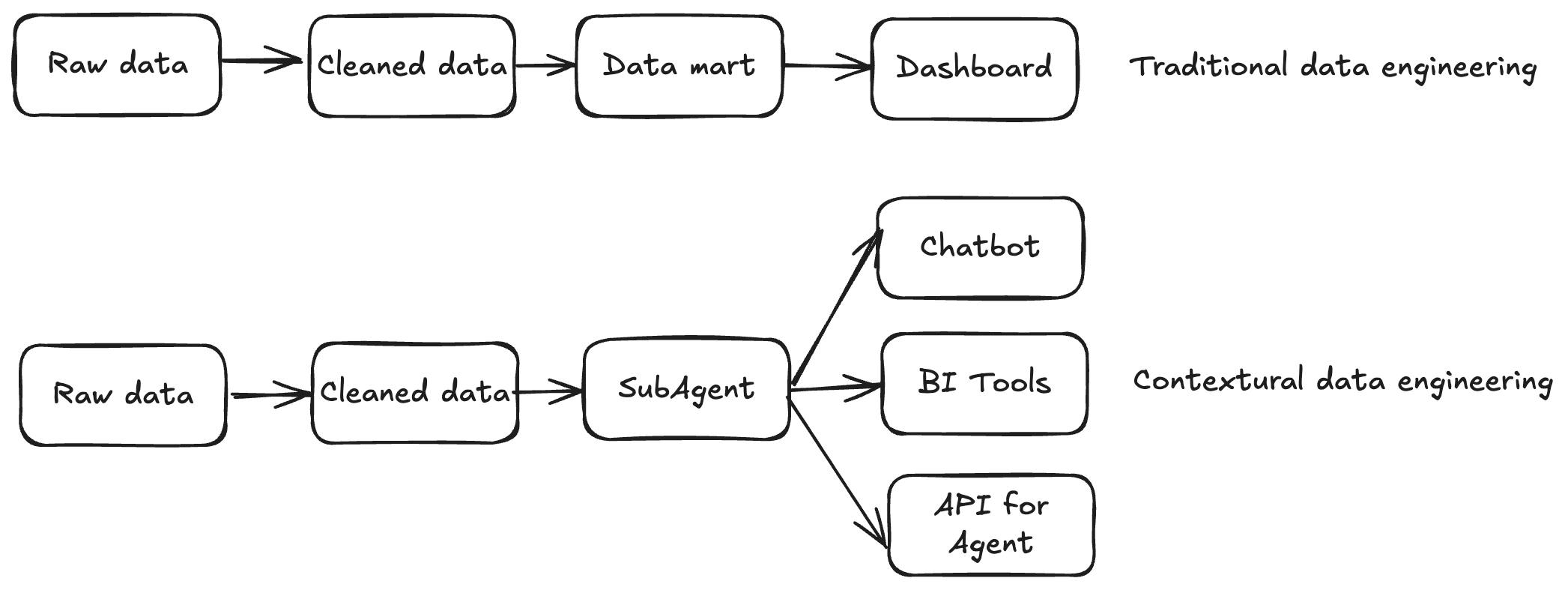
- In traditional data engineering, pipelines end with data delivery.
- In contextual data engineering, the pipeline itself becomes a knowledge graph of your data system, continuously learning from historical SQL, feedback loops, and human corrections.
It is not just about moving data and build tables — it's about understanding and evolving the context around the data.
Why It Matters
LLMs hallucinate without context
Data context is a vast and complex space. We need data engineers — the ones who know the data best — to build reusable, AI-ready contexts that ground every query and response.
Static tables don't scale for dynamic needs
Modern business questions change daily. Ad-hoc data fetch requests consume half of a data engineer's time, but the knowledge behind those queries is rarely captured or reused.
Traditional data engineering is not evolvable
The focus has long been on the data consumer side (analytics and dashboards), not the producer side where context and accuracy are built. Contextual data engineering shifts that focus — empowering engineers to produce living context rather than static artifacts.
Why Datus
Automatic Context Capture
Datus automatically captures, stores, and recalls historical SQL, table structures, metrics, and semantic layers on demand — turning every interaction into long-term knowledge.
Enhanced Long-term Memory
Dual recall mechanisms (Tree + Vector) allow the system to remember not just exact matches, but semantically related queries and patterns — forming a continuously growing "context graph" for your data.
Evolving Context Engineering
The system learns from both machine generation and human feedback, incrementally refining its context over time. Every correction, benchmark, or success story becomes part of a self-improving data memory.
Core Concepts
Long-Term Memory
We model Data Engineering Context (Long-Term Memory) as two trees:
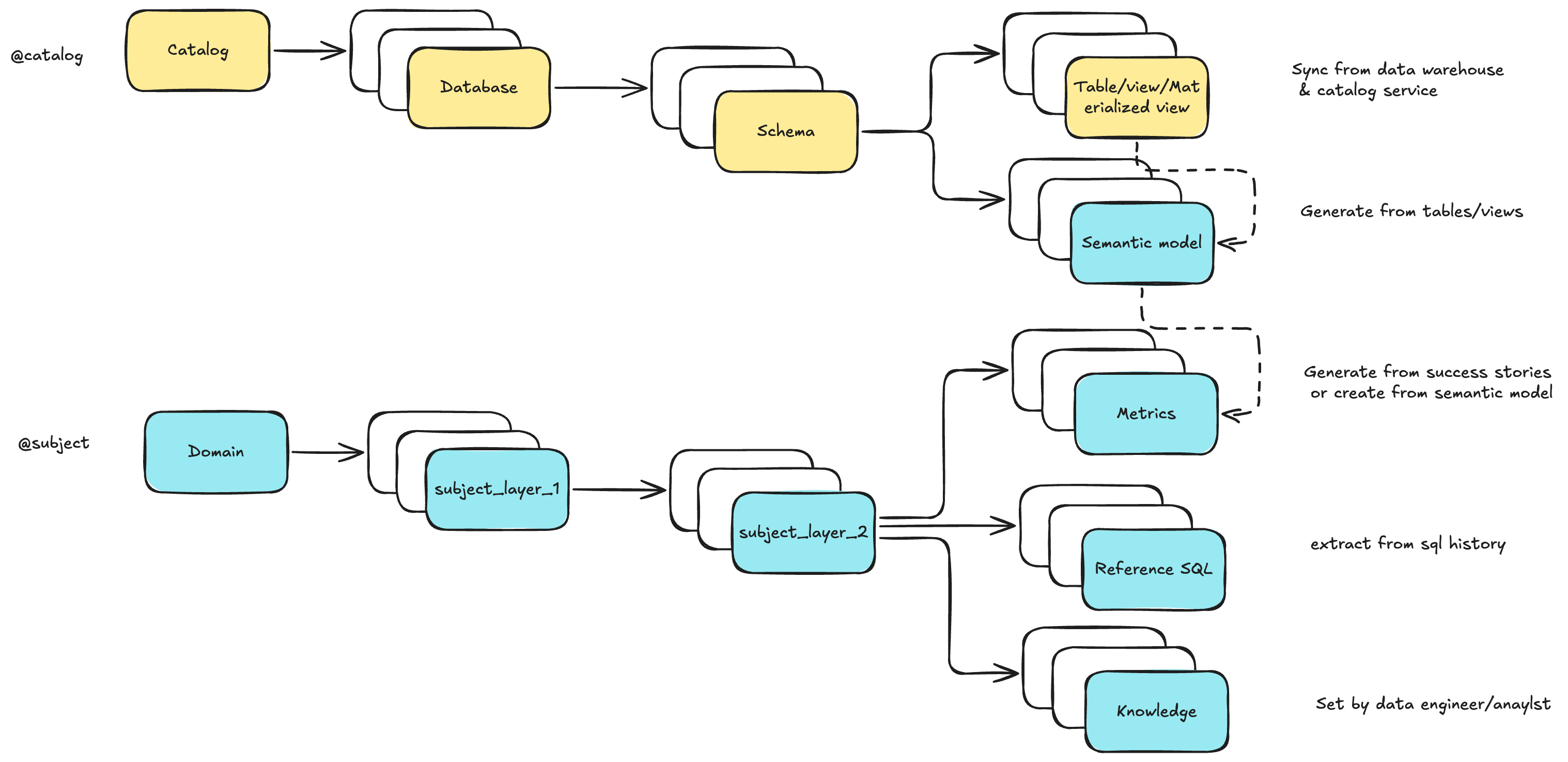
- In Datus CLI, you can browse and edit them via
/catalogand/subject - Use the
/bootstrapslash command to batch-initialize and cold-start the knowledge base - With subagents, you can define a scoped context — a curated subset of the global store that enables precise, domain-aware delivery
Interactive Context Building
Co-authored context
LLMs draft semantic models and metrics from tables and reference SQL, while engineers refine labels, metadata, and the subject tree.
Command-driven iteration
Describe the asset to create or update and the main agent delegates to the appropriate subagent automatically. Use @Agent semantic_modeling to route one request explicitly, or /agent semantic_modeling to select it for consecutive turns.
Feedback drives continuous improvement
Exploration with /chat, success-story writebacks, and issue/benchmark loops convert usage into durable, reusable knowledge.
Subagent System
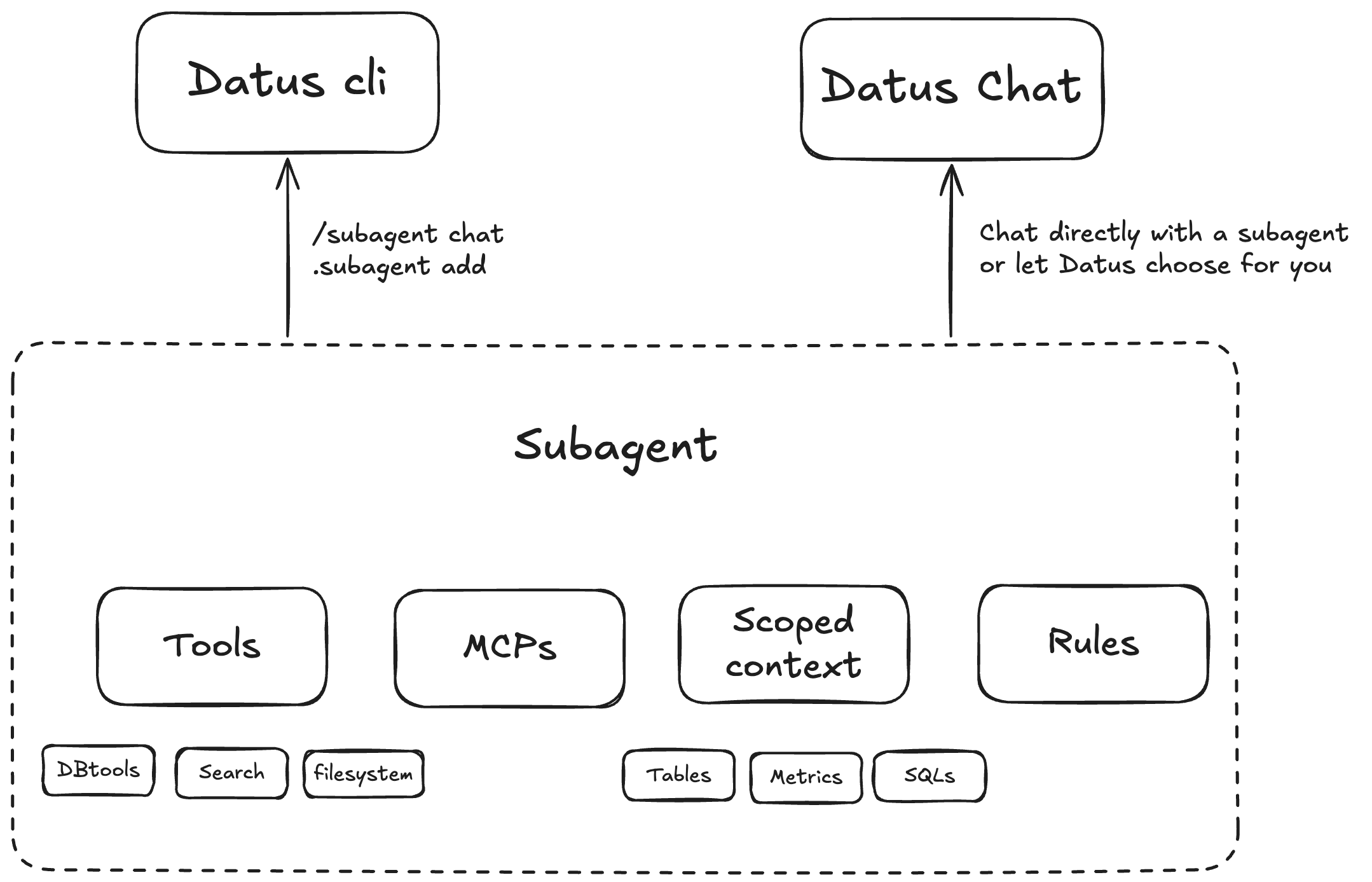
Scoped, domain-aware subagents
Package description, rules, and scoped context to unify tables, SQL patterns, metrics, and constraints for specific business scenarios.
Configurable tools and MCPs
Configure tools per scenario. Built-ins include DB tools, context-search tools, and filesystem tools. Enable and compose as needed.
RL-ready architecture
The subagent's scoped context forms an ideal RL environment (environment + question + SQL) for continuous training and evaluation.
Tools and Components
Datus CLI
An interactive CLI for data engineers with context-aware compression and search tools. Type a question in natural language and Datus routes it to the appropriate agent. Slash commands such as /datasource and /model manage the session; @Agent <name> explicitly routes one turn to a subagent, while /agent <name> selects the active subagent for subsequent turns. Press Tab on an empty prompt to switch between natural-language, SQL, and Bash input modes.
Datus Agent
A benchmarking and bootstrap utility — the batch companion to the CLI. Used to:
- Build initial context from historical data
- Run benchmarks and evaluations
- Expose corresponding APIs
Datus Chat
A lightweight web chatbot for analysts and business users, supporting:
- Multi-turn conversations
- Built-in feedback (upvotes, issue reports, success stories)
Part 2 — Hands-on Tutorial: California Schools
This walkthrough takes you through the same five outcomes the concepts above describe — building a knowledge base, packaging two subagents, and benchmarking baseline vs. context-rich answers — but you drive every step yourself. By the end you will have:
- A populated knowledge base (metadata / metrics / reference SQL)
- Two subagents (
datus_schoolsanddatus_schools_context) with different toolsets - A baseline benchmark result and a context-rich one to compare
- A multi-round evaluation that demonstrates how context evolution improves SQL accuracy
Prerequisites
You need:
datusinstalled (see the Quick Start Guide)- An LLM provider configured via
/modelinsidedatus. The picker writes provider credentials into~/.datus/conf/agent.yml. - Dosi is included in the Agent installation.
You do not need to download or cp anything. The first time datus runs without a config, it bootstraps ~/.datus/:
~/.datus/sample/— bundled sample data (created on first run; existing files are preserved on subsequent runs)~/.datus/benchmark/california_schools/— your working copy (preserved on upgrade)~/.datus/conf/agent.yml— thecalifornia_schoolsdatasource and benchmark are pre-registered
So after datus once, you can jump straight to /model and /bootstrap.
Step 1 — Open the CLI and configure your model
Inside the REPL:
> /model

──── Model Selection ────────────────────────────────────────────────────────────────────────────────────────────────────────────────────────────────────────────────────────────────
   Providers   Plans   Custom    (Tab or ←/→ to switch)
─────────────────────────────────────────────────────────────────────────────────────────────────────────────────────────────────────────────────────────────────────────────────────
  → claude  ✓  ← current
    deepseek  ✓
    gemini  ✓
    kimi  ✓
    openai  ✓
    glm  [needs setup]
    minimax  [needs setup]
    qwen  [needs setup]

─────────────────────────────────────────────────────────────────────────────────────────────────────────────────────────────────────────────────────────────────────────────────────
  ↑↓ navigate   Enter select   e edit credentials   Tab/←→ switch   Esc back   Ctrl+C cancel
The /model picker lists supported providers. Pick one and paste an API key (env vars are auto-detected). Datus persists your selection to ./.datus/config.yml (project-scoped) and credentials to ~/.datus/conf/agent.yml.
Step 2 — Bootstrap Metadata (Schema tab)
Inside the REPL:
> /bootstrap

──── Datus Bootstrap ────────────────────────────────────────────────────────────────────────────────────────────────────────────────────────────────────────────────────────────────
   Schema   SQL   Template   Semantic Modeling    (Tab or ←/→ to switch)
─────────────────────────────────────────────────────────────────────────────────────────────────────────────────────────────────────────────────────────────────────────────────────
  Schema
  Crawl the live database schema into the metadata RAG.
─────────────────────────────────────────────────────────────────────────────────────────────────────────────────────────────────────────────────────────────────────────────────────

datasource:        california_schools
[ ]  overwrite  (Space to toggle — checked = overwrite, otherwise incremental)                                                                                                      ^

─────────────────────────────────────────────────────────────────────────────────────────────────────────────────────────────────────────────────────────────────────────────────────
  ↑↓/Tab next field   ←/→ switch tab   Ctrl+R run this tab   Esc cancel
Press Ctrl+R. Expected output:
⏺ 💬 Running bootstrap task: metadata

⏺ 💬 Crawling schema from datasource california_schools (mode=overwrite)…

⏺ 🔧 schema_crawl()
  └─ ✓

⏺ 💬 Schema crawl finished.

⏺ 💬 Bootstrap finished.
Learn more about metadata management.
Step 3 — Bootstrap Dosi Semantic Models and Metrics (Semantic Modeling tab)
Switch to the Semantic Modeling tab and fill in:
datasource:    california_schools
success_story: ~/.datus/benchmark/california_schools/success_story.csv
overwrite:     [x]
success_story.csv is a CSV of (question, sql) pairs that Datus uses as evidence when authoring Dosi datasets, relationships, and metrics. The file ships with the sample dataset, so the path above resolves directly. This authoring flow uses the built-in Dosi engine.
Press Ctrl+R. Expected output:
⏺ 💬 Running bootstrap task: semantic_modeling
⏺ semantic_modeling(~/.datus/benchmark/california_schools/success_story.csv)
  ⎿  Dosi YAML validated and reconciled to the Knowledge Base
⏺ 💬 semantic_modeling bootstrap completed
Datus writes validated Dosi YAML to the project's subject/semantic_models/ directory and reconciles both semantic objects and metrics to the Knowledge Base.
Step 4 — Bootstrap Reference SQL (SQL tab)
Switch to the SQL tab and fill in:
datasource:   california_schools
sql_dir:      ~/.datus/benchmark/california_schools/reference_sql
pool_size:    3
subject_tree: california_schools/Continuation/Free_Rate,
              california_schools/Charter/Education_Location,
              california_schools/Charter-Fund/Phone,
              california_schools/SAT_Score/Average,
              california_schools/SAT_Score/Excellence_Rate,
              california_schools/FRPM_Enrollment/Rate,
              california_schools/Enrollment/Total
overwrite:    [x]
Press Ctrl+R. Expected output:
⏺ gen_sql_summary(/Users/liuyufei/.datus/benchmark/california_schools/reference_sql/california_schools_1.sql)
  ⎿  Done (2 tool uses · 19.4s)
⏺ 💬 gen_sql_summary (/Users/liuyufei/.datus/benchmark/california_schools/reference_sql/california_schools_1.sql):


   SQL Summary: Continuation School Free Rate Bottom 3

        🔍 Query Purpose

This query identifies the 3 lowest eligible free meal rates for students aged 5-17 enrolled in Continuation Schools, using data from the frpm table.

......

⏺ 💬 Indexed 13 reference SQL item(s).

⏺ 💬 Bootstrap finished.
Datus parses every .sql file under sql_dir, generates a natural-language summary, extracts joins and filters, and indexes the result under the supplied subject leaves.
For more, see the reference SQL docs.
Step 5 — Browse what you built
Still inside the REPL:
You should see the subject tree populated with metrics and SQL summaries:
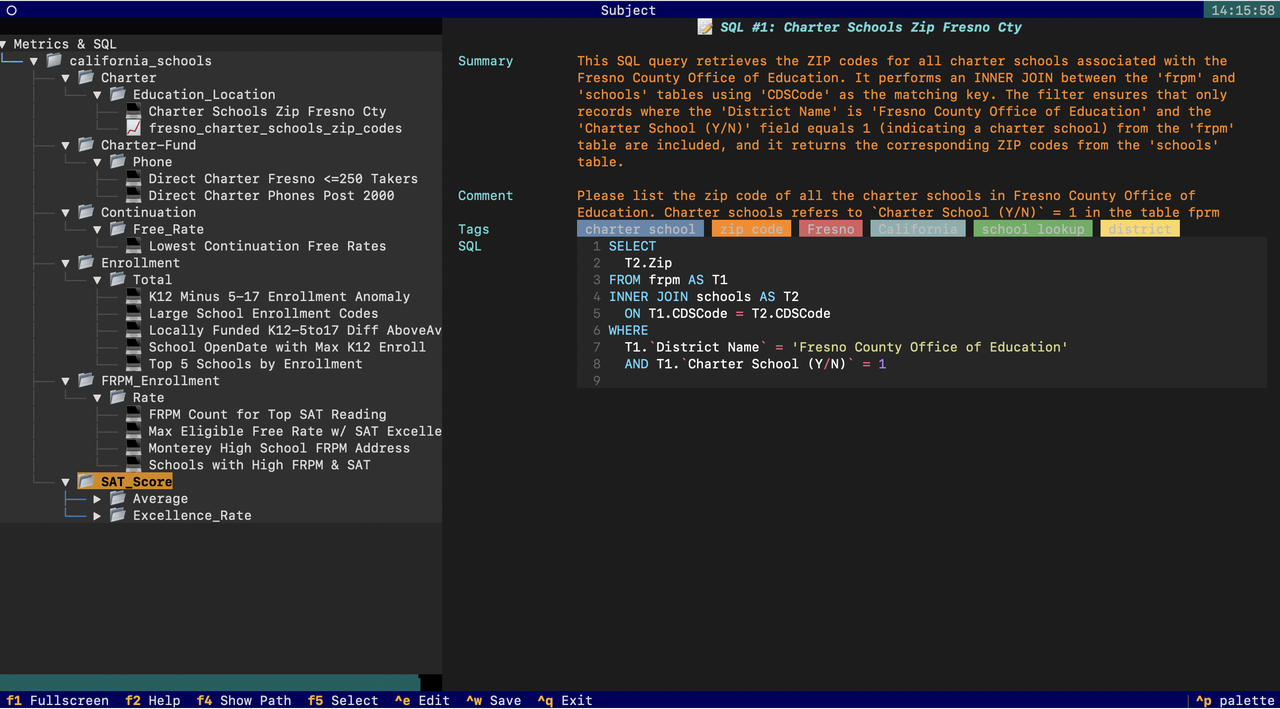
Use /catalog to inspect table/column metadata. These two screens are the primary way you (and the AI) navigate the knowledge base going forward.
Step 6 — Create two subagents
Open ~/.datus/conf/agent.yml and append the following two blocks under agent: — agentic_nodes (defining the two subagents) and workflow (defining their orchestration pipelines):
  agentic_nodes:
    datus_schools:
      system_prompt: datus_schools
      prompt_version: '1.0'
      prompt_language: en
      agent_description: ''
      tools: db_tools
      mcp: ''
      rules: []
    datus_schools_context:
      system_prompt: datus_schools_context
      prompt_version: '1.0'
      prompt_language: en
      agent_description: ''
      tools: context_search_tools, db_tools
      mcp: ''
      rules: []
  workflow:
    datus_schools:
    - datus_schools
    - execute_sql
    - output
    datus_schools_context:
    - datus_schools_context
    - execute_sql
    - output
The key contrast is context_search_tools: only datus_schools_context can read the metrics and reference SQL you built in Steps 2–4. That difference is exactly what the next benchmark measures.
Invoking a subagent
/agent with no argument opens the TUI (Enter switches the active agent); with a name it switches the default agent to <name>:
For one-off routing on a single question, use the @Agent <name> mention:
The same subagents can also be served from Datus-Chat.
Step 7 — Benchmark baseline vs context-rich
Outside the REPL, run the baseline first:
datus-agent benchmark \
  --datasource california_schools \
  --benchmark california_schools \
  --workflow datus_schools

datus-agent eval \
  --datasource california_schools \
  --benchmark california_schools \
  --output_file schools1.txt
Then the context-rich one:
datus-agent benchmark \
  --datasource california_schools \
  --benchmark california_schools \
  --workflow datus_schools_context

datus-agent eval \
  --datasource california_schools \
  --benchmark california_schools \
  --output_file schools2.txt
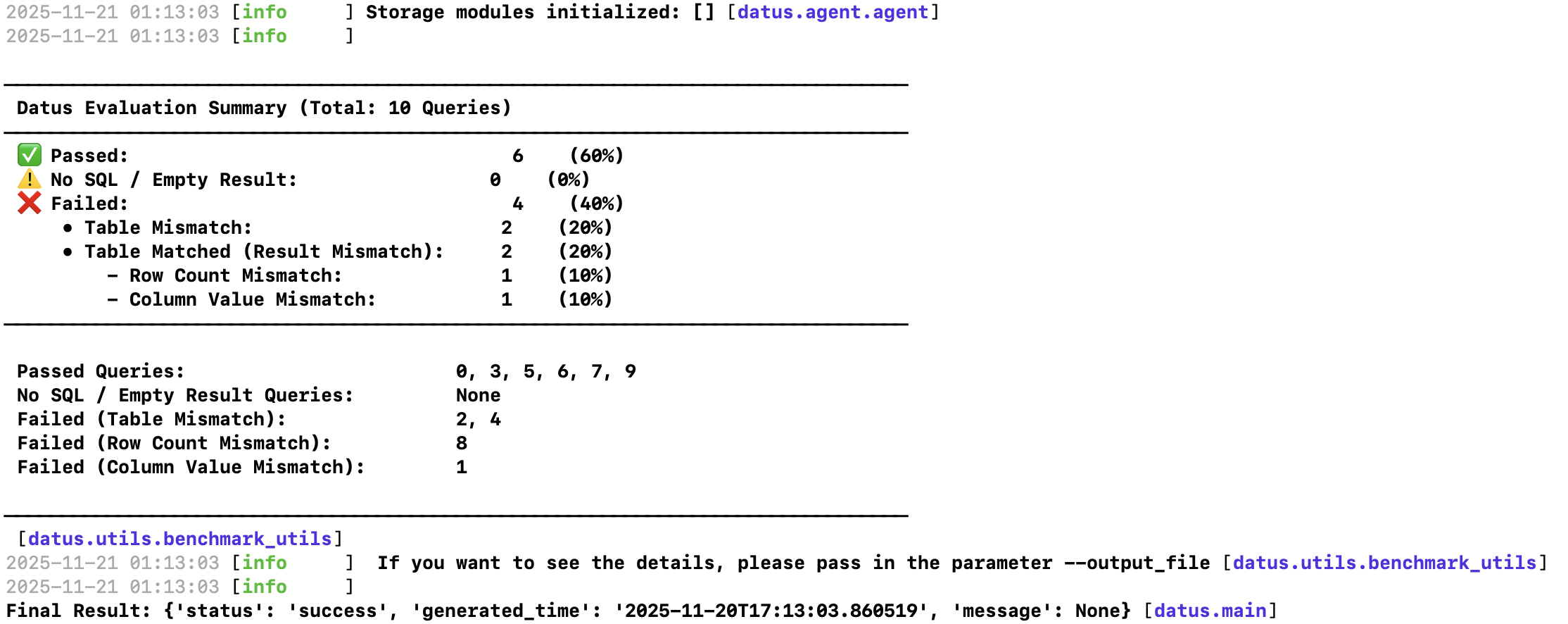
Diff schools1.txt and schools2.txt. The context-rich agent produces more semantically correct SQL, fewer hallucinated columns, and better joins — because it can recall the reference-SQL patterns and metric definitions you built earlier.
Step 8 — Multi-round benchmark
This is the most powerful demonstration of contextual data engineering — repeated runs that let context evolve:
datus-agent multi-round-benchmark \
  --config ~/.datus/conf/agent.yml \
  --datasource california_schools \
  --benchmark california_schools \
  --workflow datus_schools_context \
  --max_round 4 \
  --group_name context_tools
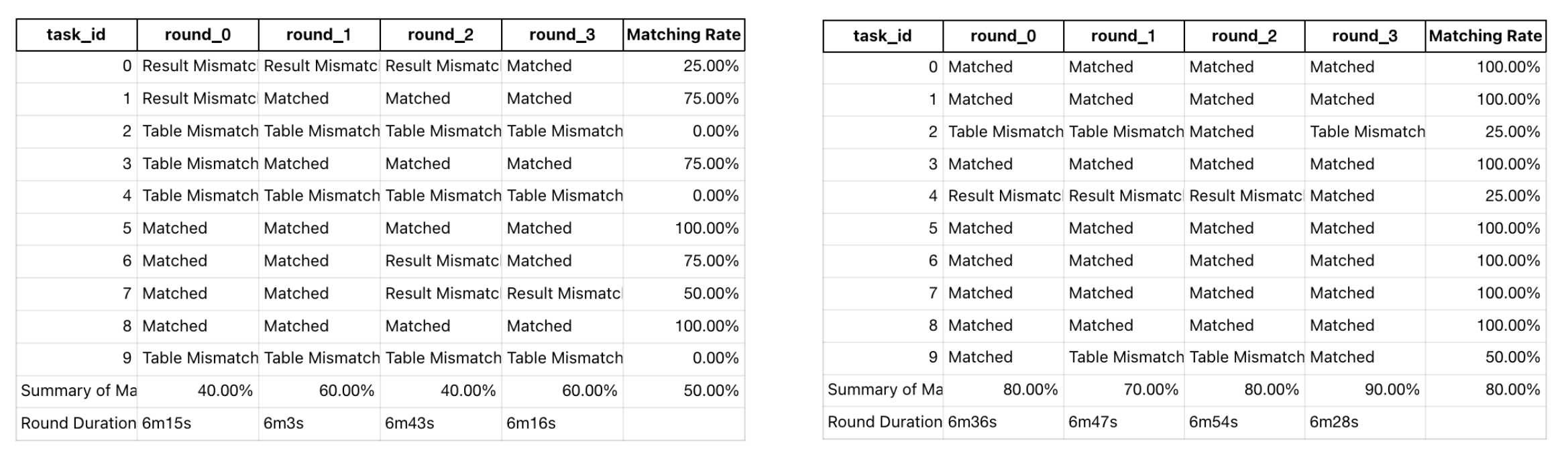
The left graph shows accuracy without context tools (datus_schools); the right one with them (datus_schools_context). Notice how the latter both starts higher and improves faster across rounds.
Summary
You have just driven the full Datus loop end-to-end:
| Component | Outcome |
|---|---|
| Metadata bootstrap | Schema, column descriptions, sampled rows indexed |
| Semantic model bootstrap | Dosi semantic models generated from success stories |
| Metrics bootstrap | Business metrics extracted and placed in the subject tree |
| Reference SQL bootstrap | 19 SQL files summarized, joined, indexed |
| Subagents | Two scoped agents with deliberately different toolsets |
| Benchmark | Quantified baseline vs. context-rich accuracy |
| Multi-round | Watched context evolution drive accuracy upward |
The same workflow applies to any domain — point /bootstrap at your own success stories and SQL directory, and you have a real, evolvable knowledge base in under an hour.
Next Steps
To try a different hands-on scenario, return to Choose Your Getting Started Path.
-
Knowledge Base
Explore detailed context management with metadata, metrics, and reference SQL.
-
Workflow Integration
Integrate context into automated data pipelines and orchestration.
-
CLI Context Commands
Master the CLI with hands-on context management commands.
-
Configuration
Configure advanced settings for agents, datasources, and storage.
Related Resources
- Metadata Management - Organize and manage table schemas and column descriptions
- Metrics Definition - Define reusable business metrics
- Reference SQL Tracking - Capture and leverage historical query patterns
- Context Command Reference - Complete CLI context command reference