HTML Dashboard Generation Guide
Overview
gen_visual_dashboard turns a question — "build me a store sales overview", "show the new-user activation funnel" — into a self-contained HTML dashboard: an interactive web page with filters, KPI cards, charts, and tables. Change a filter and the SQL re-runs against your database, the view refreshes on the spot. When the run finishes the page opens in your browser, served by a local datus --web backend.
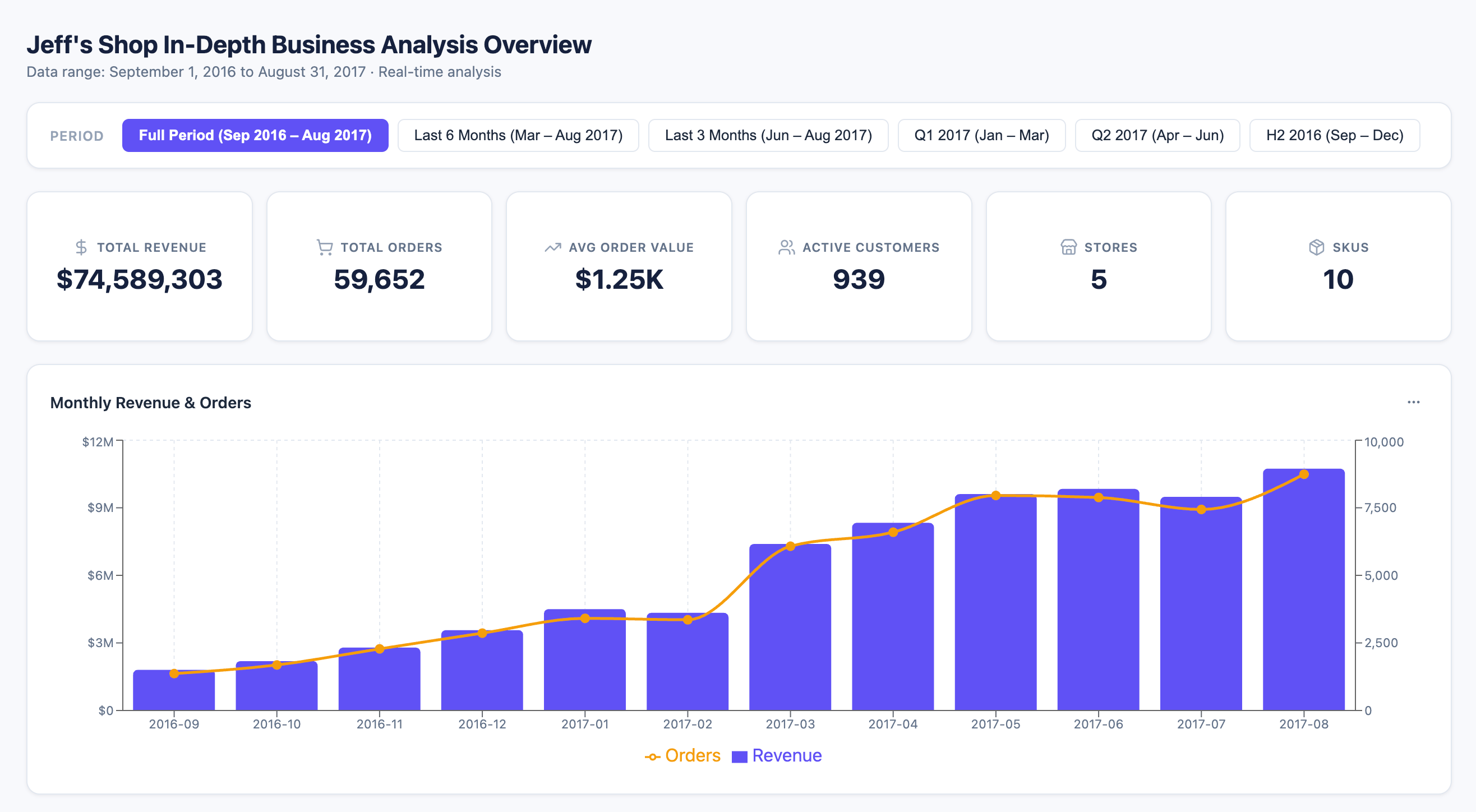
An HTML dashboard is a live data view — every change to the date range, region, product line, or any other filter renders the saved SQL template with the new parameters and re-queries the database. That's the key difference from gen_visual_report, which bakes data into the page at build time: reports are for sharing in emails or briefings; dashboards are for the cases where you need to keep exploring or hand the page to someone who'll filter it themselves.
For interactive BI dashboards on Superset or another external platform, ask the main agent to use the installed BI plugin directly. The old BI dashboard node is documented only as a legacy compatibility path.
Quick Start
First confirm datus --web is running locally — the dashboard's filters need this backend to answer queries:
Activate gen_visual_dashboard as your current agent — the legacy /gen_visual_dashboard ... slash invocation was removed in favor of /agent-based selection:
(Or run /agent with no args to pick it from the unified agent TUI — Enter to edit, s to set as default.) Once active, just describe what you want — state the question, the filter dimensions you want, and the headline metrics:
Build a store sales overview dashboard. Support filtering by region and month, with GMV, order count, and AOV as the headline metrics.
Build a new-user activation funnel dashboard. Filter by acquisition channel and signup window, show signup → first-order → day-2 retention conversion.
To edit an existing dashboard, reference it by display name or by its short id:
Once the dashboard is built, the chat panel prints the HTML file's absolute path together with the datus --web --datasource <ds> command anyone else needs to run before opening that file — open the HTML in a browser and the dashboard is live. Closing and reopening it later requires no re-build.
Start from a Metric or Your Own SQL
gen_visual_dashboard accepts two equally valid starting points:
-
From metrics — reference an existing metric with
@Metrics <subject>.<group>.<metric>(three segments — subject tree path + metric name). The agent will pull its definition, dimensions, and time windows from your semantic layer, and turn the dimensions into filters. Best when your project already has a curated metric registry (see Semantic Modeling for Dosi authoring). -
From SQL — paste the SQL you want the dashboard built on. The agent identifies the parameterizable conditions in it (date ranges, enum values, ID lists, …), promotes them to filters, and composes charts around the rest. Best for ad-hoc exploration or when the metric you need doesn't exist yet.
You can also mix the two — point at a metric for the headline KPI and supply ad-hoc SQL for a specific drilldown or filter.
How a Dashboard Gets Built
graph LR
    A[Your question] --> B[Identify filters<br/>and headline metrics]
    B --> C[Write SQL as<br/>parameterized templates]
    C --> D[Compose the<br/>view + charts]
    D --> E[Compile HTML<br/>+ start backend]
    E --> F[Open in browser<br/>live filter queries]
The agent reads your question, figures out which dimensions are filters and which signals are the headline metrics, writes each query as a parameterized Jinja2 template (a params declaration + the template body), and saves them under dashboards/<slug>/ in your project. Once the HTML opens in the browser, every filter change POSTs to the local datus --web backend at /api/v1/dashboard/query — the backend renders the template into SQL, executes it, and the result hydrates the charts. The whole loop stays inside your environment; no data leaves it.
You can re-invoke gen_visual_dashboard later to edit the same dashboard in place.
Edit Section by Section
Every dashboard is built out of independent modules — filters, individual charts, KPI cards, data tables. You can iterate on just one without touching anything else:
Change the AOV chart in store_sales_overview to a region-grouped bar chart
Add a "product category" filter to store_sales_overview
Drop the customer composition pie chart, it's not needed
Reorder the KPI cards so GMV comes first
Each call is a surgical change. The agent locates the affected module, edits it, rewrites only the SQL templates that changed, and leaves the rest of the layout, filters, and charts exactly as you reviewed them.
What the Agent Has Access To
To build the dashboard, gen_visual_dashboard uses everything that's already wired into your project:
- Your semantic layer — defined metrics and dimensions take precedence over ad-hoc SQL whenever they fit the question; dimensions become filters directly.
- Your databases — the agent reads schema, samples values, and trial-runs the parameterized templates against your configured datasources to confirm they execute cleanly.
- Your knowledge base — curated reference SQL and business glossary entries are consulted before the agent writes anything from scratch.
- Previous dashboards — when you ask the agent to use an existing dashboard as inspiration, it can read that dashboard's filter layout and chart configuration.
You don't call any of this yourself — just write the prompt.
Configuration
gen_visual_dashboard works out of the box; no configuration is required. The settings below are optional overrides in agent.yml:
agent:
  agentic_nodes:
    gen_visual_dashboard:
      model: claude              # Optional: defaults to the configured model
      max_turns: 30              # Optional: defaults to 30
      web_host: localhost        # Optional: host baked into the HTML's query endpoint
      web_port: 8501             # Optional: port baked into the HTML's query endpoint
| Parameter | Required | Description | Default |
|---|---|---|---|
model |
No | LLM model to use | Configured default |
max_turns |
No | Maximum agent iterations before the run stops | 30 |
web_host |
No | Host baked into the HTML's filter-query endpoint | localhost |
web_port |
No | Port baked into the HTML's filter-query endpoint | 8501 |
query_endpoint |
No | Full URL override; takes precedence over web_host + web_port composition |
Composed from web_host + web_port |
When you share the generated HTML with someone else, they'll need to start the backend locally with the same
datus --web --datasource <ds>command. If the host or port differs, updateweb_host/web_portinagent.ymlaccordingly — or setquery_endpointdirectly — so the URL baked into the HTML matches the actual backend.
Tips for Better Prompts
You'll get a sharper dashboard when your prompt includes:
- The scenario — "store sales overview", "new-user activation funnel", "merchant reconciliation".
- The headline metrics — "GMV, order count, AOV", "activation rate, retention rate".
- The filter dimensions — "by region / by month", "by channel / by signup window", "by store_id".
- The time window — "last 90 days", "all of 2025" (this also becomes the default value of the date-range filter).
If you skip any of these the agent will guess from your project's metrics and the SQL you gave it, and will only ask when intent is genuinely ambiguous.
Content Source Declarations
When authoring or editing an artifact, declare each ChartCard / BlockHandle id and query source as literals so Scope & Sources can connect content blocks to their queries. Keep shared KPI components visual-only and wrap each tile with a literal BlockHandle at its call site. Use a literal queryIds array when several queries contribute, including the queries providing a frontend-calculated ratio's numerator and denominator.
validate_render() rejects dynamic ids, dynamic query sources, and spread card props that hide the declarations, with actionable repair messages. Existing dynamic wrappers continue to run, but must expose static declarations before an authored edit can finalize. Do not declare unused queries just to connect the graph.